
How To Order From ZarvyPharm - Complete Step By Step Guide
Step 0: Registration and Account Setup Process
Create Account, Login, and Member Benefits at ZarvyPharm
STEP 0: Please Register First!
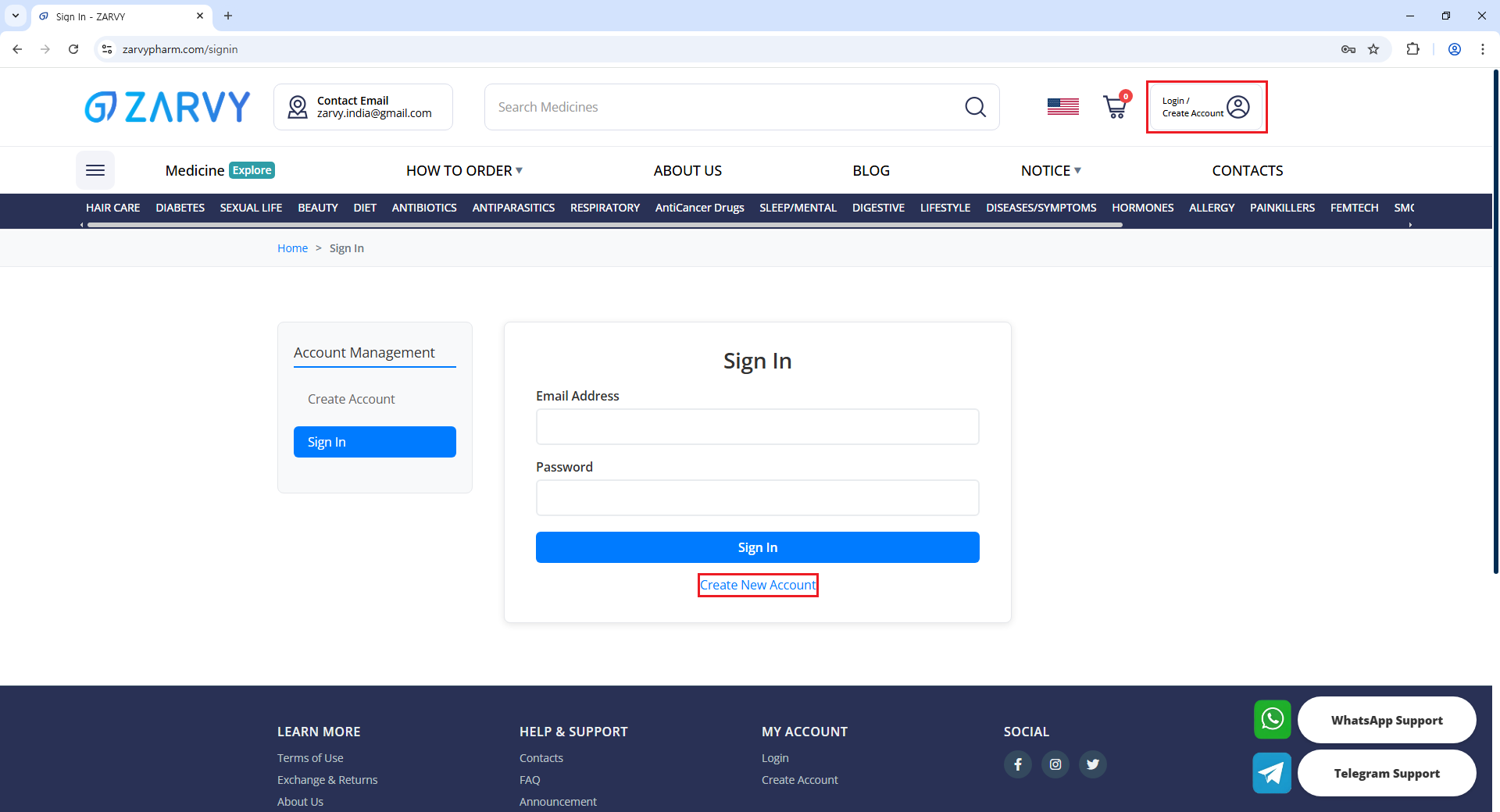
Signing up on ZarvyPharm is quick and easy.
Before you can place an order, you need to create an account and log in to ZarvyPharm.
Click “Create Account” on the left menu or top right corner of the website.
- Fill in your personal information (First Name, Last Name, Email Address, Password).
- Confirm your password and, if you have one, enter a referral code.
- Provide your Date of Birth, Gender, and Shipping Address details.
- Enter your phone number for order notifications and verification.
💡 For Billing Information, you can simply select “Same as Shipping Address” to quickly copy the details from your Shipping Information.
- Agree to the Terms of Use (required) and optionally sign up for promotional emails.
- Click “Complete Registration” to finish creating your account.
- Verify your email address if required, then log in with your credentials.
💡 Having an account allows you to track your orders, save your information for faster checkout, and access exclusive deals, coupons, and promotions available only to members.
Step 1: Product Search and Selection Guide
Find Medications, Add to Cart, and Review Products on ZarvyPharm
STEP 1: Product Search & Select
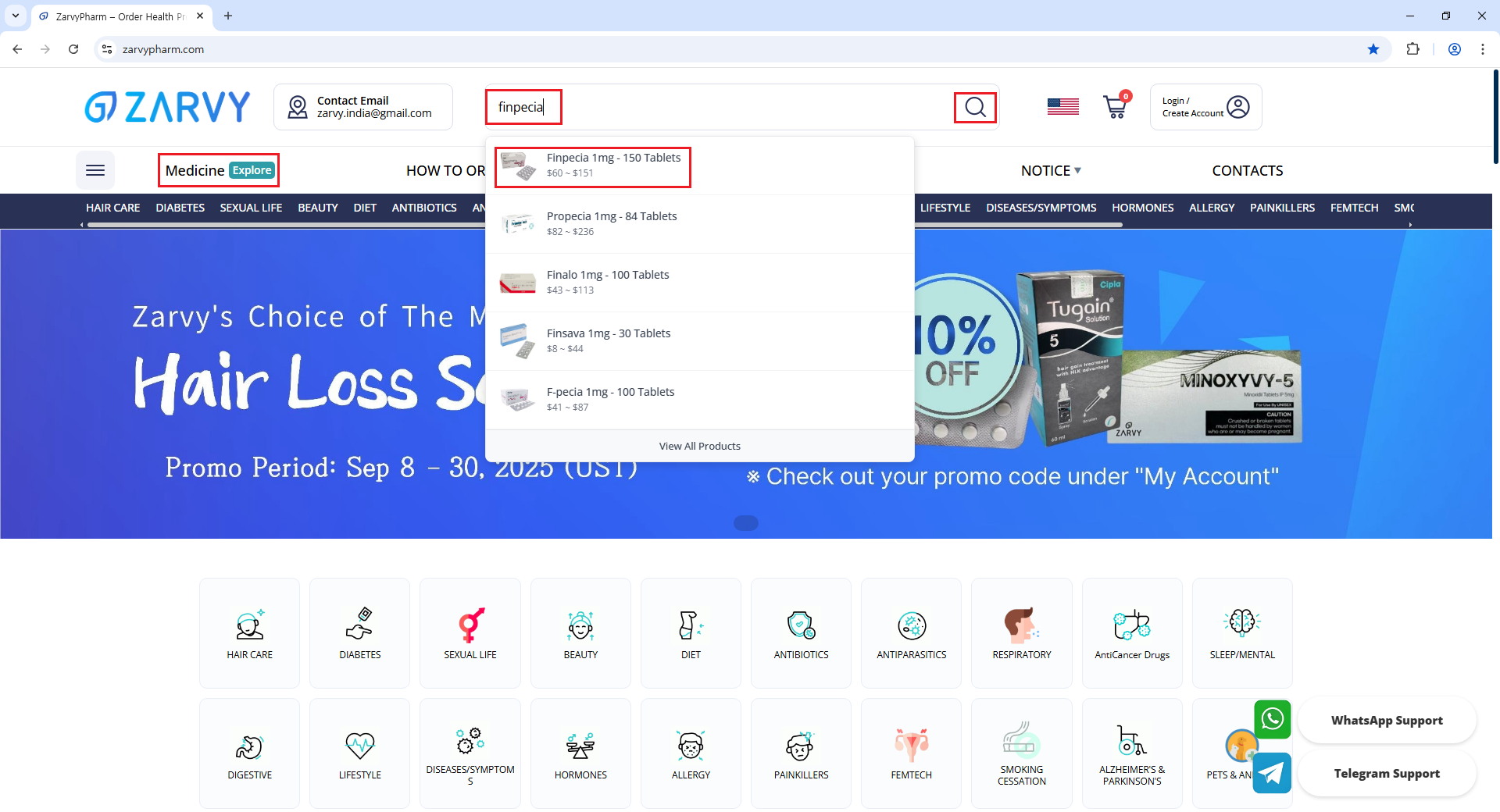
- Find the product: Go to the "Medication" menu or use the search bar to find the specific product you need.
- Go to the product description page: Select the options/quantity and add the item to your cart.
- Review your products: On the cart page, you can see a summary of the items you have added.
💡 Click 'Proceed' to move on to the Checkout page, where you can place your order.
Step 2: Checkout Process and Payment Options
Shipping Information, Billing Details, Shipping Methods, Coupons, Credits, and Payment Options
STEP 2: How To Check-out
Once you've added your desired items to the cart,
you'll proceed to the checkout stage to finalize your order. This step consists of the following sections:
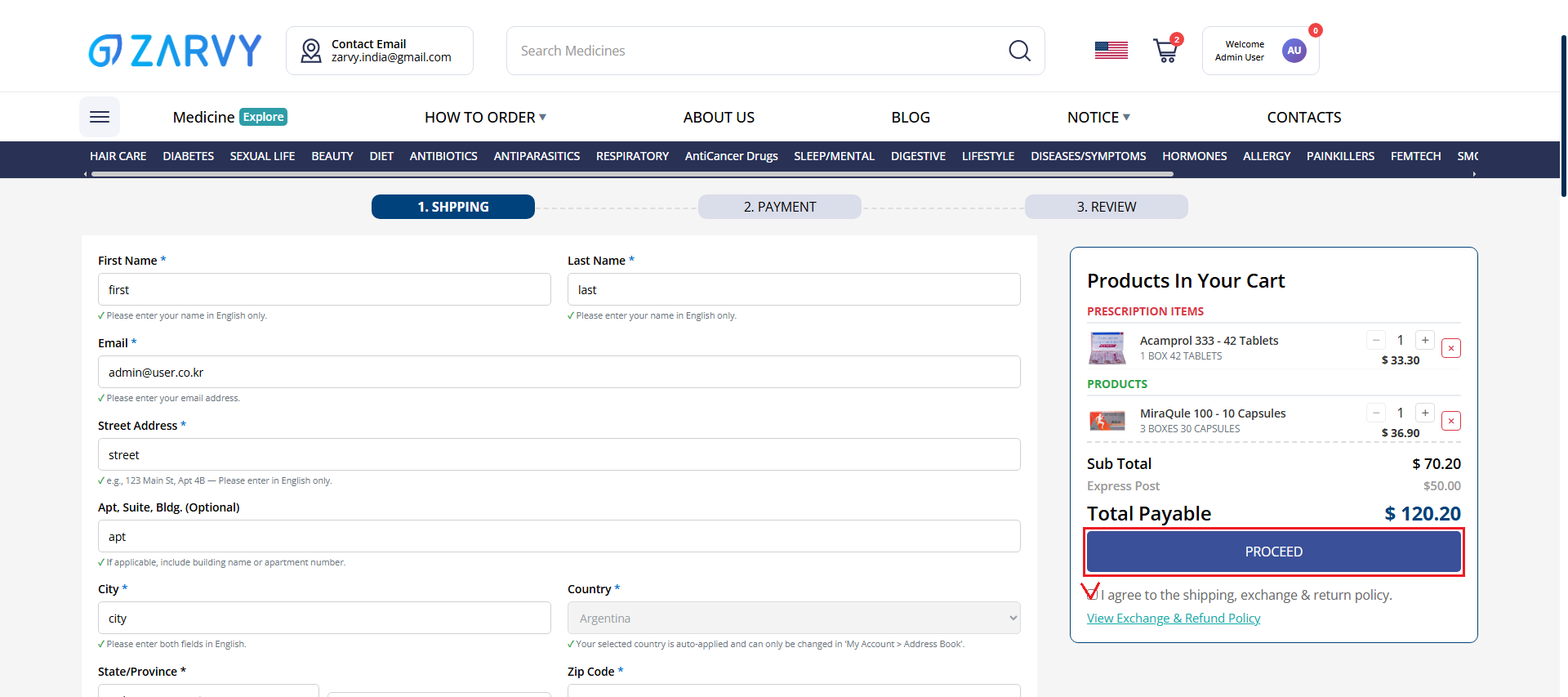
📦 Shipping Information
This is the address where your products will be delivered.
Please fill in the required shipping information, including:
- First & Last Name
- Email Address
- Street Address
- Apt, Suite, Bldg. (Optional)
- City / Country
- State/Province
- Zip Code
- Phone Numbers
“Leave a note” box
At the bottom of the Shipping Information section, you will find a field - 'leave a note'
Here, you may enter simple requests or questions related to your order or shipping.
⚠ Note: Please keep your note limited to order or delivery-related inquiries only.
Our staff will review your note when confirming your order and provide a reply accordingly.
All notes you leave and the corresponding replies from our team can be conveniently viewed anytime in My Account > Settings > Inbox.
🧾 Billing Information
If your billing address is the same as your shipping address, you can check the box to auto-fill.
Otherwise, please enter:
- First & Last Name
- Email Address
- Street Address
- Apt, Suite, Bldg. (Optional)
- City / Country
- State/Province
- Zip Code
- Phone Numbers
💡 By selecting “Same as my shipping address”, all the details you entered in the Shipping Information section will be automatically copied into the Billing Information section.
This makes the process faster and more convenient, as you don’t need to re-enter the same details twice.
🚚 Shipping Options
Please choose ONE shipping method below. Each option varies in delivery speed & cost:
Parcel Shipping (RM, RD, LP, etc.)
Shipping Period: 10-20 Days | Shipping Fee: $15 | Tracking Number: RMS/INDIA POST
Express Post (EMS)
Shipping Period: 5-10 Days | Shipping Fee: $50 | Tracking Number: EMS
Express Shipping (DHL, FEDEX, etc.)
Shipping Period: 3-7 Days | Shipping Fee: $100 | Tracking Number: DHL/FEDEX
📌 Please choose the most suitable shipping plan based on urgency, budget, and reliability.
🎁 Coupons & Credits
Click "Coupons" to view and apply available promo codes in real time.
Check your available points under:
- Remaining Credits: Total accumulated points
- Applicable Credits: Credits that can be used for this order
💡 You can apply the credits within the applicable limit to lower your total bill.
📒 Notes for Coupons & Credits
✓ Minimum Purchase Requirement
Coupons and/or credits can only be applied to orders of $50 or more.
This rule applies in all three cases:
- (1) When using both coupons and credits together → Minimum order: $50
- (2) When using only coupons → Minimum order: $50
- (3) When using only credits → Minimum order: $50
✓ Order of Application
Coupons must be applied first. Credits can only be applied after coupons have been used.
✓ Credit Usage Limit
Credits cannot be applied to more than 50% of the order total (this rule does not apply to using coupons).
When applying both coupons and credits, the 50% credit limit is calculated based on the remaining balance after coupon deduction (Order Total – Coupon Discount = Eligible Balance).
💳 Payment Methods
ZarvyPharm supports 3 main payment options:
① Wire Transfer (International Swift Transfer Only)
- ✓ Processing Time: 2 to 5 business days
- ✓ Required Information: SWIFT code, account number, etc.
⚠ Note: If payment not confirmed within 9 days after placing order, it will be auto-cancelled.
② Online Wire Transfer (wise.com)
- ✓ Processing Time: Usually 1 to 2 days
(transaction time may vary depending on currency match) - ✓ Redirection: you will be redirected to wise.com to proceed with the payment.
- ⚠ Note: Processing Time could differ with currencies you choose
⚠ Note: Processing Time could differ with currencies you choose
③ Pay with Cryptocurrency
Cryptocurrency payments are available with two options as below. Please choose one of the methods below:
Option 1: Automated Crypto Payment
- ✓ Processing Time: Fast payment with automatic confirmation
- ✓ Multiple Cryptocurrencies: Support for 100+ cryptocurrencies
- ✓ Secure: Industry-standard security and compliance
- ✓ Supported Coins: BTC, ETH, USDT, USDC, BNB, SOL, XRP, ADA, DOGE, TRX and more
Option 2: Direct Personal Wallet Transfer
- ✓ Processing Time: 1-2 hours after blockchain confirmation
- ✓ Direct Transfer: Send cryptocurrency directly to our wallet address
- ✓ Deposit Time: Must be completed within 30 minutes
- ✓ Supported Coins: BTC, ETH, XRP, USDT, BNB, SOL, USDC, DOGE, TRX, ADA
⚠ Note: For personal wallet payments, only the coins listed above are accepted. Payments made with any other cryptocurrencies will not be processed.
Step 3: Order Review and Confirmation
Order Confirmation Email, Order Number, Order Status Check, and Prescription Requirements
STEP 3: ORDER REVIEW
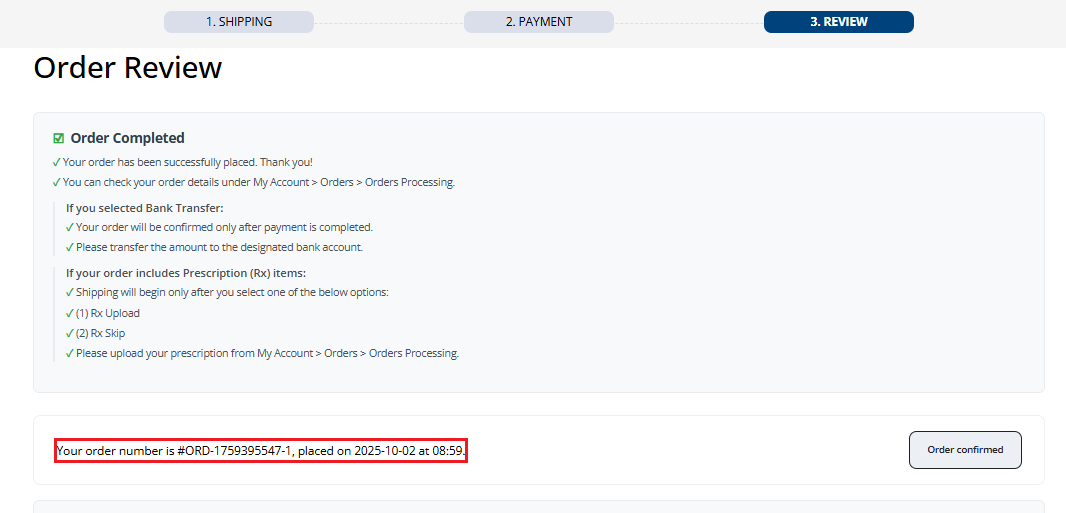
Order Confirmation & Check Email
- ✓ After placing your order, you'll be redirected to the 'Review' page,
where you can check your Order ID and payment details. - ✓ An Order Confirmation Email will be sent to your registered email address,
including order summary, billing details, and recipient information.
⚠ Note
No prescription is required for OTC-only orders.
However, if your order contains both OTC and Rx items,
Please choose one of the two Rx options: “Upload Prescription” or “Rx Skip.”
For more how-to details, please proceed to the next step, "My Account".
Check Order Number & Status
- ✓ Your Order Number is shown at the top of the Review Page, and also sent to your registered email address.
- ✓ You can check your order status anytime by going to My Account > Orders > Orders Processing.
Step 4: My Account and Order Tracking
Order Status Tracking, OTC Orders, Rx Orders, Prescription Upload, Order Processing, Cancelled Orders, and Completed Orders
STEP 4: MY ACCOUNT
Check Your Order Status
Whether your order is for Rx (prescription) or OTC (over-the-counter) items, you can always check your order status via:
My Account > Orders > Order Processing
In this menu, click on the specific order to open the 'Order Details' page. Here you can check the exact status of each item in your order.
⚠ Note:
In the Orders list, master orders may show as "In Progress" at the first order-number level. For the exact per-item status, always open 'Order Details'. Customer-facing statuses are organized as below (total 8):
1. OTC Orders (No Prescription Required)
- ✓ Once your payment is confirmed, your order status automatically updates to 'Processing Shipment'.
- ✓ Within a few business days, your order will be dispatched and updated to 'Shipped', along with a tracking number.
- ✓ Track Order: You can click on the tracking number in your order page to track the shipment in real time.
FAQ) How do I check my order status?
Simply click on the tracking number listed in your order details — you'll be redirected to 4tracking.net, where you can track your shipment in real time.
2. Rx Orders (Prescription Required)
After payment is confirmed, your order status changes to Prescription Needed.
Also, You will see 2 options on your order page:
✓ Upload Rx:
Upload your doctor's prescription. Once verified by our admin, your order status changes to Processing Shipment, and shipping will begin shortly after.
✓ Skip Rx:
If you choose to skip uploading a prescription, you must first read and agree to a disclaimer. After confirmation, your order status will be updated to Processing Shipment.
⚠ Note
※ Please note: If you choose the “Rx Skip” option instead of proceeding with “Rx Upload,” you are required to agree to the disclaimer.
By doing so, you formally accept the terms stated within it,
which limit ZarvyPharm’s liability for customs risks associated with Rx orders, and fully disclaim responsibility for any requests regarding exchange, refund, or reshipment
—such requests cannot be processed.
※ Additional note: If you do not select either option within 3 days from the payment confirmation date,
the system will automatically treat your order as Rx Skip and update the status to Processing Shipment,
after which it will be dispatched within a few days.
Please be aware that if you fail to make a selection and your order is automatically processed as Rx Skip,
any disadvantages resulting from this will not be the responsibility of Zarvy Pharm.
Once treated as Rx Skip, it is deemed that you have agreed to the disclaimer,
meaning that in the event your order is held at customs, exchange, refund, or reshipment will not be possible.
Please take note and exercise caution.
[Orders > Orders Processing Menu]
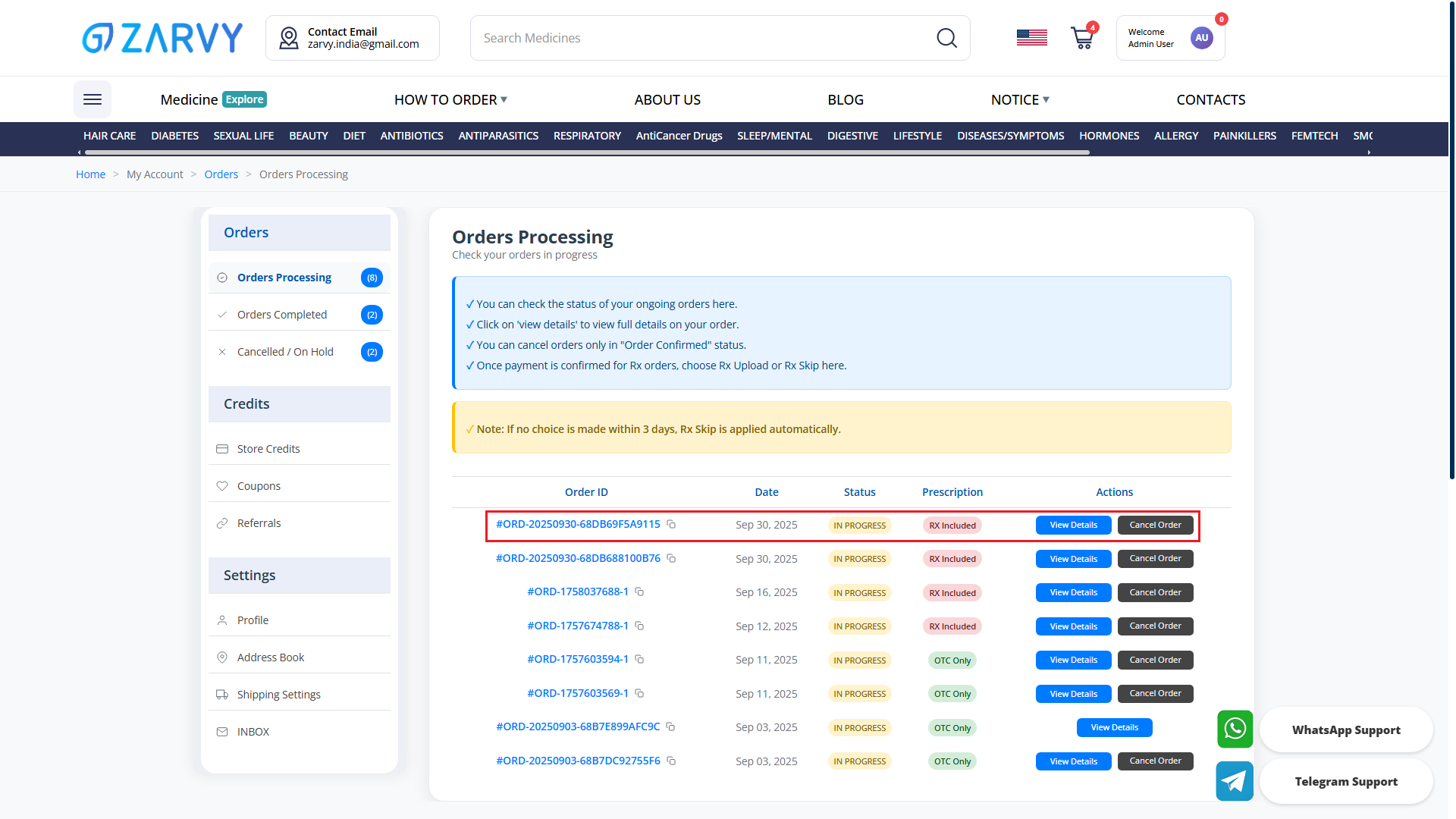
You can check your delivery status directly in your account.
Go to My Account > Orders > Orders Processing", then select the order to view the 'Order Details' page.
The order statuses available for your orders on the 'Order Details' page are as follows:
✓ Order Confirmed (= Awaiting Payment)
While in Awaiting Payment status, a "Cancel Order" button will appear next to the order, allowing you to cancel anytime.
✓ Rx Needed
※ If you have not selected either Rx Upload or Rx Skip, all Rx orders will appear as 'Prescription Needed' in the order details page.
※ If no option is selected within 3 days, the system will automatically treat it as 'Rx Skip', and the order status will change to 'Processing Shipment'.
✓ Processing Shipment
Your order is in the pre-shipment stage. Once updated to Processing Shipment, it will be dispatched within a few days.
✓ Shipped
This means your order has been dispatched successfully.
Tracking number has been issued and is visible in My Account.
Click the tracking number for real-time delivery tracking.
⚠ Note: Because this is a cross-border delivery, the order may remain in “Shipped” status for most of the transit period.
After the parcel is successfully delivered to your address, the status will change to "Delivered".
⚠ Note: For inquiries regarding more accurate shipping status, please contact us via Whatsapp/Telegram Live Chat, Contacts (1:1 inquiry board), or by email at [email protected]
[Orders > Cancelled / On Hold]
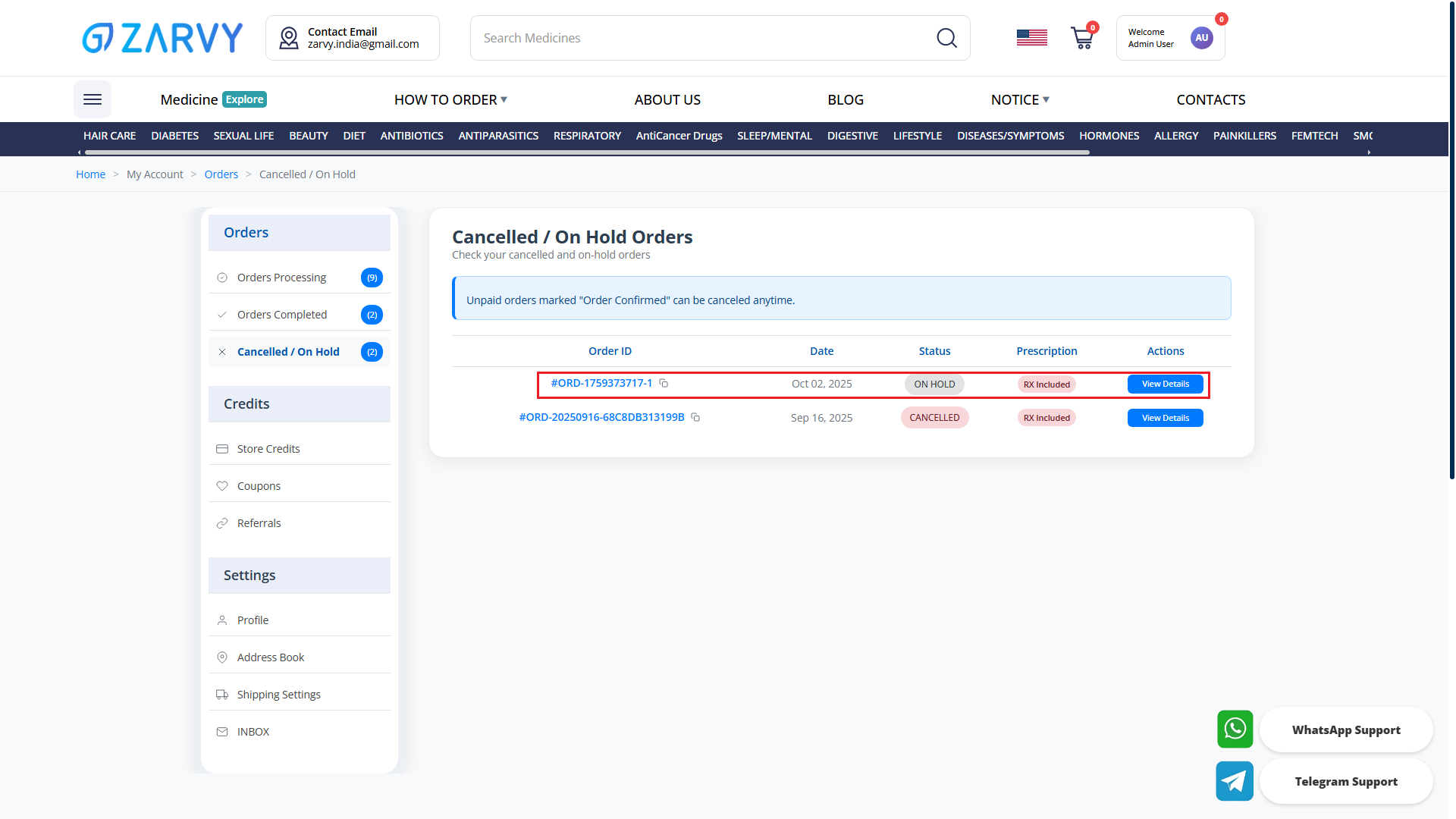
Check Cancelled or Failed Orders
✓ Cancelled
applies while the order is still in 'Order Confirmed' (awaiting payment).
You may cancel from 'My Account > Orders > Orders Processing'.
⚠ Note: From “Rx Needed” and “Processing Shipment” status onward, all orders can no longer be canceled.
✓ Payment Failed
Displays orders where the payment has failed.
shown under Orders > Cancelled/On Hold in two cases:
(1) payment delayed 9+ days after ordering (applies only for wire transfer payment option),
(2) on-hold due to mismatched payer name/order amount or similar discrepancies.
⚠ Note: What does “Payment Failed” mean?
It is either mismatch between order name and payer name, or Mismatch between order amount and payment amount.
or else, your payment delayed for more than 9 days after placing the order.(applies only for wire transfer payment option)
⚠ Note: These cases are automatically categorized in the system as “On Hold” due to payment failure.
[Orders > Orders Completed]
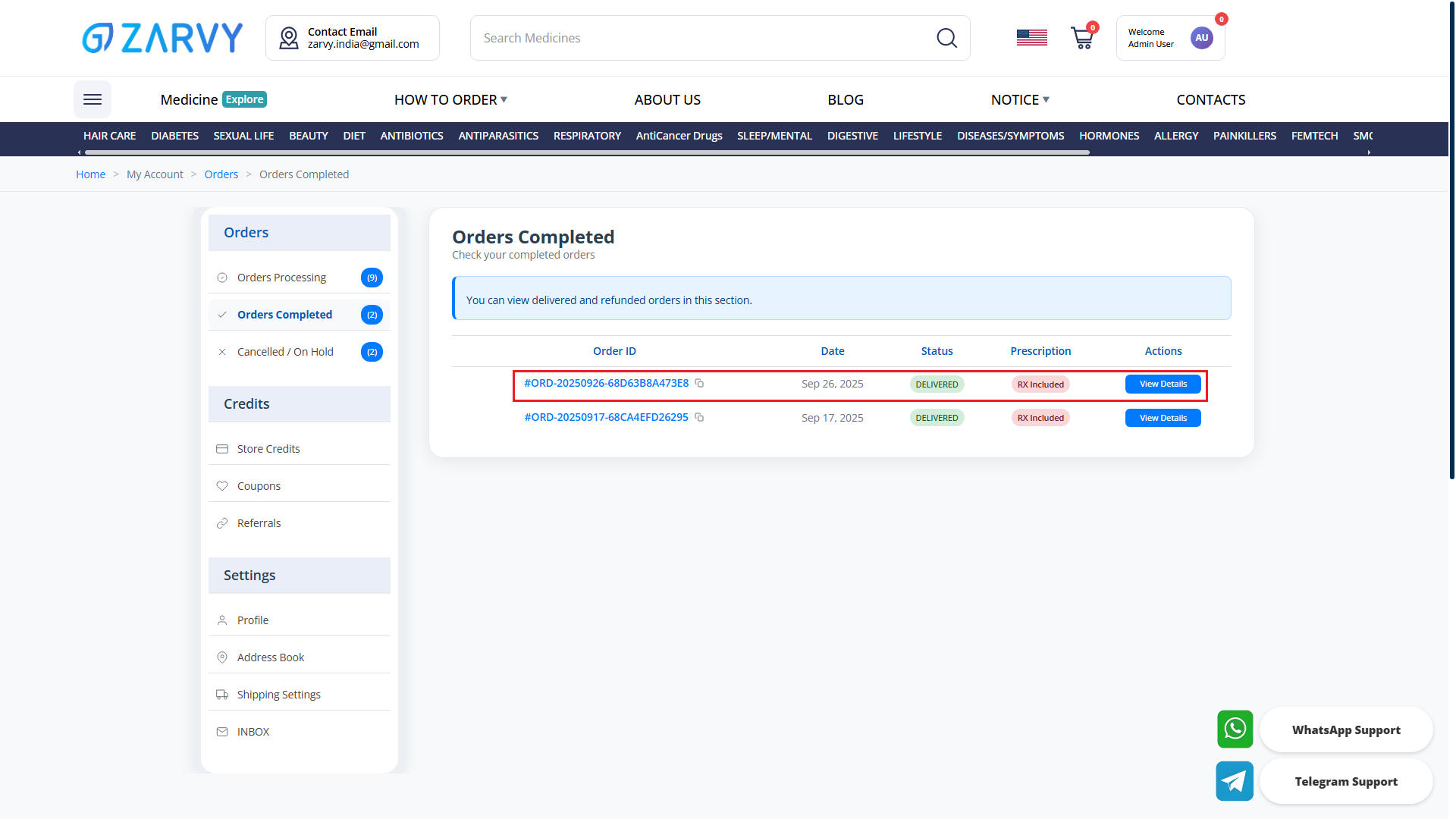
✓ Delivered
the parcel has been delivered to your address.
✓ Refunded
refund has been processed per policy.
💡 For further inquiries, please reach out to us via the “Contacts” menu or through our WhatsApp/Telegram channels.
Our team will be happy to assist you and provide guidance as quickly as possible.